Nobody likes Windows 12

Dakota Tebaldi

Well-known member
VVO Supporter 🍦🎈👾❤
Joined
Sep 19, 2018
Messages
9,680
Location
Ohio
Joined SLU
02-22-2008
SLU Posts
16791
The newest Windows 11 update breaks the Recovery Environment, confirmed by Microsoft:
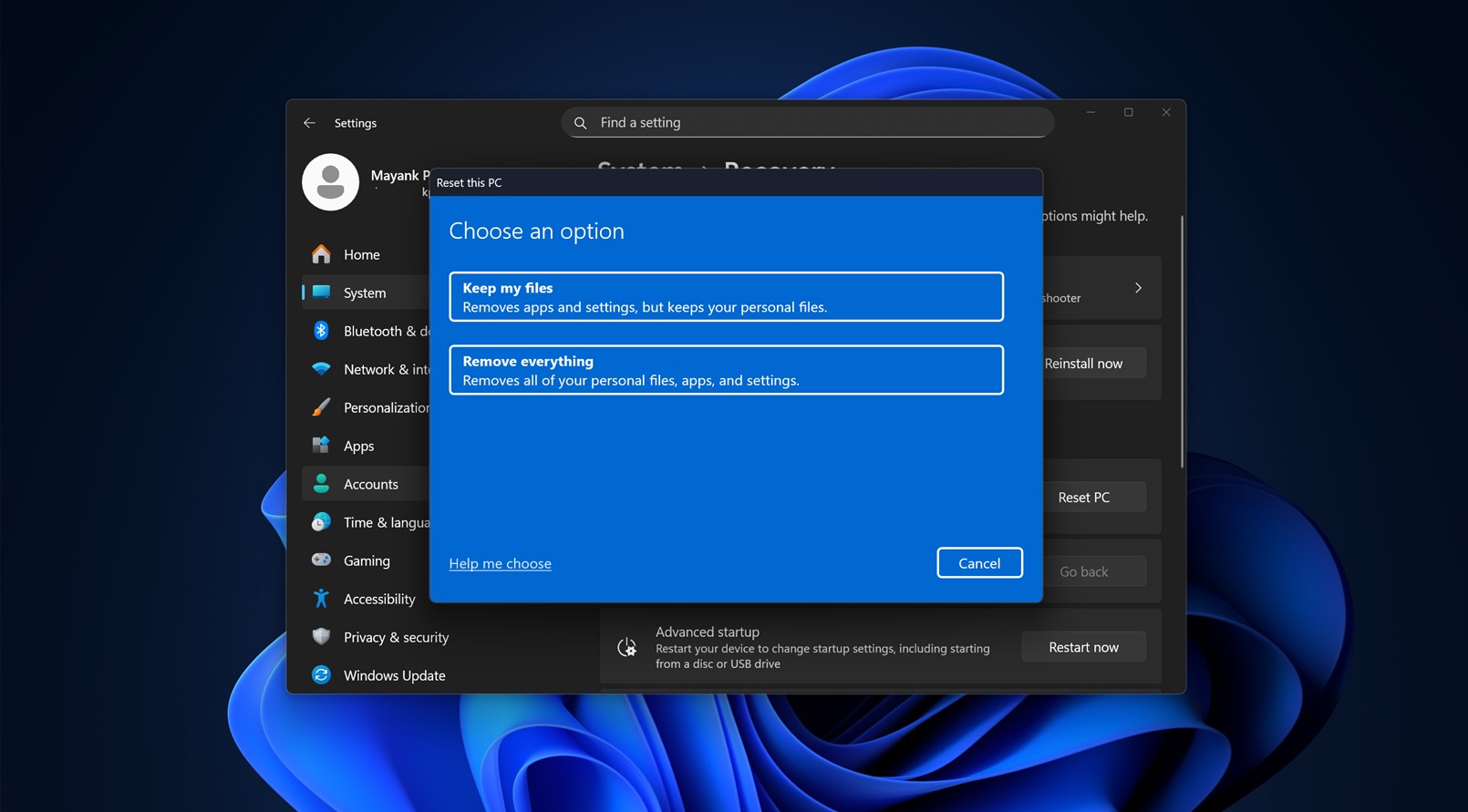

The RE is the screen that pops up the next time you reboot after a blue-screen error, or if you've restarted your computer two or three times in a row after Windows starts booting but before it fully loads. The screen lets you choose to repair Windows, start up in safe mode, or just load the UEFI/BIOS. Except after this latest update you can't actually select any of the options, lol.
 
  • 1Thanks
Reactions: Ellie

Argent Stonecutter

Emergency Mustelid Hologram
Joined
Sep 20, 2018
Messages
7,356
Location
Coonspiracy Central, Noonkkot
SL Rez
2005
Joined SLU
Sep 2009
SLU Posts
20780
Probably part of their war against Windows without online accounts.
 
  • 1Agree
Reactions: Ellie

Beebo Brink

Climate Apocalypse Alarmist
Joined
Sep 20, 2018
Messages
6,986
SL Rez
2006
I don't think I have enough functioning brain cells to navigate away from Windows, but this video made me think about Linux for a few hot moments. I'm currently subscribed to Microsoft 365, mostly for access to Excel. My intention was to outright buy Excel this year when my original sub was due for renewal, but... I didn't have the energy to deal with the change, so I clicked renew instead. Maybe next year...

Having watched the entire video on the evils of Windows 11, the one complaint that mystified me was the claim that it's riddled with ads. What ads? So I clicked around a bit and realized that yes, there are ads in the Search panel and in some slide out panel that keep shooting out of the left side of my screen. In the full year that I've had Windows 11, they never registered in my brain. Apparently I have very effective automatic filters that just block that stuff out before it hits my consciousness. A good sign that I haven't lost all brain function after all.

 
  • 1Like
Reactions: Cindy Claveau

Bartholomew Gallacher

Well-known member
Joined
Sep 26, 2018
Messages
6,799
SL Rez
2002
Well I switched for playing games over to CachyOS, works great for most of them. And it's also a great way to escape Microslop's forced AI bloatware under Windows.

As additional benefit some games even have a view more frames per second compared to Windows. I don't mind...
 

Beebo Brink

Climate Apocalypse Alarmist
Joined
Sep 20, 2018
Messages
6,986
SL Rez
2006
A few months after I started using Windows 11, an update didn't activate properly. The computer guy who assembled my box wouldn't deal with this issue remotely; he wanted me to bring the computer to him, which meant getting my neighbor to load the computer into the car for me and driving about 30mins away. That was just about a year ago, and I never got around to it. The only sign of the update failure is the words "Activate Windows" permanently displayed on the lower right corner of my screen. I've found it's pretty easy to ignore.

Based on all the horror stories I've read about Win11, I'm probably better off without the updates.
 

Sid

Lord of the plywood cubes.
VVO Supporter 🍦🎈👾❤
Joined
Sep 20, 2018
Messages
6,983
I'm still on Windows 10.
Microsoft will do security upgrades if needed for another year.
I hope windows 12 will be around before I get myself a new computer second half of this year. So I can skip 11 altogether.
My current one is 7 years old now. I never had a computer that long before.
 

GoblinCampFollower

Well-known member
Joined
Sep 20, 2018
Messages
5,205
SL Rez
2007
I have A LOT riding on Windows 11 since all personal and work computers are on it. Too late to go back.... I just need them to pull their heads out of their asses. I am almost hoping some big failure can be traced back to "Vibe coding" since that might cool some of the hype for using AI to do everything.... though I am sure they'd blame the humans involved anyway.
 

Beebo Brink

Climate Apocalypse Alarmist
Joined
Sep 20, 2018
Messages
6,986
SL Rez
2006
I hope windows 12 will be around before I get myself a new computer second half of this year. So I can skip 11 altogether.
If Win12 doesn't show up soon, with a good report card for fixing all the issues of Win11, I may just bite the bullet to install Linux Mint instead. After doing yet more research, I've found that most of what I do on a daily basis -- including playing the Sims -- would be perfectly workable on Linux.
 

Knutz Scorpio

Well-known member
Joined
Sep 20, 2018
Messages
451
SL Rez
2010
Joined SLU
02-15-2014
I think it was back in Sept I switched to Linux Mint and so much has happened that's made me glad to be away from Windows 10 and 11. Sims 4 and Sims 3 have worked nearly perfectly, maybe even better than with MicroSlop (Just added 'MicroSlop' to the dictionary). Only possible hitch I can see is a bunch of old docs in WordPerfect and Quattro, but I'm certain I can run them in something like WinBoat if needed.
 

Beebo Brink

Climate Apocalypse Alarmist
Joined
Sep 20, 2018
Messages
6,986
SL Rez
2006
I think it was back in Sept I switched to Linux Mint and so much has happened that's made me glad to be away from Windows 10 and 11. Sims 4 and Sims 3 have worked nearly perfectly, maybe even better than with MicroSlop (Just added 'MicroSlop' to the dictionary). Only possible hitch I can see is a bunch of old docs in WordPerfect and Quattro, but I'm certain I can run them in something like WinBoat if needed.
I'm thinking the easiest avenue would be to add a new internal drive where I install Linux Mint, then select that as the boot drive when I start up my computer. This would leave me the option to return to Win11 for those very few apps -- like my tax program -- that I use on a few occasions.
 
  • 1Agree
Reactions: Knutz Scorpio

Knutz Scorpio

Well-known member
Joined
Sep 20, 2018
Messages
451
SL Rez
2010
Joined SLU
02-15-2014
I'm thinking the easiest avenue would be to add a new internal drive where I install Linux Mint, then select that as the boot drive when I start up my computer. This would leave me the option to return to Win11 for those very few apps -- like my tax program -- that I use on a few occasions.
I'd also unplug the old drive during the Linux install to prevent accidentally erasing your data. Afterwards you'll even be able to access the data on the old drive while running Linux.
 

Argent Stonecutter

Emergency Mustelid Hologram
Joined
Sep 20, 2018
Messages
7,356
Location
Coonspiracy Central, Noonkkot
SL Rez
2005
Joined SLU
Sep 2009
SLU Posts
20780
I'd also unplug the old drive during the Linux install to prevent accidentally erasing your data. Afterwards you'll even be able to access the data on the old drive while running Linux.
Yeh, I would do that, though I've only had a problem with Windows eating other installs without asking.
 
  • 1Agree
Reactions: CronoCloud Creeggan

Bartholomew Gallacher

Well-known member
Joined
Sep 26, 2018
Messages
6,799
SL Rez
2002
A few months after I started using Windows 11, an update didn't activate properly. The computer guy who assembled my box wouldn't deal with this issue remotely; he wanted me to bring the computer to him, which meant getting my neighbor to load the computer into the car for me and driving about 30mins away. That was just about a year ago, and I never got around to it. The only sign of the update failure is the words "Activate Windows" permanently displayed on the lower right corner of my screen. I've found it's pretty easy to ignore.
Yup, Microsoft blows at least one update a year big time right now. Nothing new.

Which makes me really why Microsoft still hasn't introduced a COW file system to Windows, like Apple did with APFS 10 years ago, because system restore only works meh in many cases.

A COW file system has a big advantage here: file system snapshots. Before running an update a snapshot gets created, and if an update failed you can just boot that snapshot instead and rollback the update.

Well, that's how Linux does it with Btrfs in CachyOS as well. I can just boot into the last 50 update snapshots with my boot manager by using the cursor keys, if I want to. And the oldest snapshots are deleted automatically.
 

Argent Stonecutter

Emergency Mustelid Hologram
Joined
Sep 20, 2018
Messages
7,356
Location
Coonspiracy Central, Noonkkot
SL Rez
2005
Joined SLU
Sep 2009
SLU Posts
20780
Copy On Write, where blocks are not updated in place but instead a new block is written and the block-list is updated to point to the new copy. Generally a journal-based file system where the file system on disc is structured as a log of changes, usually coalesced periodically into snapshots for efficiency.
 
  • 1Thanks
Reactions: Erich Templar

Bartholomew Gallacher

Well-known member
Joined
Sep 26, 2018
Messages
6,799
SL Rez
2002
Right. And if anyone thinks this is a new technology: no, it is not. The concepts have been around since the 1970-80s in memory systems, the first storage technology utilising big parts of it was WAFL from Netapp in the 1990s.

The most popular and still best file system of that category is ZFS, which started development in 2001 and was released by SUN Microsystems in 2006 (!). Apple introduced its own COW file system named APFS in 2016, which is nowadays the default file system of all Macs.

COW file systems have some interesting features compared to more conventional ones: when using 2 storage devices or more in RAID1 they can protect your data from bit rot with seal-healing capabilities. Which is why data hoarders just love them.

The other thing are snapshots, which are dirt cheap and easy. It can make updates very secure, but also makes backup so much easier, because you will always save the snapshot which is not being worked actively on. While the rest of the storage continues to work.

One drawback is that because of the design running VM images on them is not great. Also computing check sums for the data has an impact.
 

Cindy Claveau

Radical Left Degenerate
Joined
Sep 21, 2018
Messages
3,488
Location
US
SL Rez
2005
Joined SLU
June 2007
SLU Posts
44403
  • 2Thanks
Reactions: Sid and Dakota Tebaldi

Dakota Tebaldi

Well-known member
VVO Supporter 🍦🎈👾❤
Joined
Sep 19, 2018
Messages
9,680
Location
Ohio
Joined SLU
02-22-2008
SLU Posts
16791
I'm thinking the easiest avenue would be to add a new internal drive where I install Linux Mint, then select that as the boot drive when I start up my computer. This would leave me the option to return to Win11 for those very few apps -- like my tax program -- that I use on a few occasions.
When I first started using Linux in 2022, I did it exactly that way - bought a separate drive, installed that OS on it, and then whenever I booted my computer I could choose which OS I wanted to use. I had that separate Windows install hanging around all the way up until just last month actually, when I finally got rid of it and repurposed that drive, and I felt comfortable doing that just because it had been close to a year since the last time I'd really *needed* to boot Windows for anything, other than keeping Windows itself updated. But yeah, it's super useful to have around, especially at the beginning when you're just starting to dip your toe into Linux.

In fact, it's probably really the only safe way to have both. I have seen reports from time to time that if you try to install both Windows and Linux partitions on a single drive, they'll tend to fight - often Windows will do things that just break or even flat out delete the other partition.

BTW - if your Windows drive is formatted as NTFS, your Linux OS should be able to read/write to and from it just fine. Meaning if there's a document in your Windows drive that you need to grab while you're in Linux you can just mount the drive and go into it and get it, and even save back to it. Very convenient! I don't think it works if your Windows drive is FAT, though. And I don't think it works the other way around (read/writing the Linux drive from inside Windows), but a USB drive solves that problem easy enough.
 
  • 1Thanks
Reactions: Beebo Brink