Dropbox is alienating its user base and basically sucks now

Katheryne Helendale

🐱 Kitty Queen 🐱
Joined
Sep 20, 2018
Messages
10,472
Location
Right... Behind... You...
SL Rez
2007
Joined SLU
October 2009
SLU Posts
65534
Thumb drives are small, easy to lose, and highly pilferable. It takes a lot more effort for someone to get into my Google Drive (it's not impossible, but unless you're really desperate to get at my school papers, it's not worth the effort). I use Google Drive as short-to-medium storage of files I access often because it's cross-platform, integrated in my Windows and Linux desktops and my Android phone, and if I don't have either one of these on hand, I can still access my files anywhere I have access to a web browser. Anything important is saved to my server at home, which has its own backup regimen. In short, cloud storage for me is many times more convenient and secure than thumb drives.
 

BuckClyde

New member
Joined
Jun 3, 2019
Messages
7
I jumped out of Dropbox premium shortly after purchasing a new Surface Pro 4 back in 2016. I picked up the five user version of Office 365 for $99. Each user gets 1 TB of OneDrive storage. So, for the same $99 a year I was paying for Dropbox Premium, I get an entire Office Suite and 1 TB of cloud storage. Plus, I fell in love with OneNote (especially on my Surface Pro with the pen) and use it every day both for work and personal notetaking.

Does OneDrive occasionally have its moments? Yes, but the integration has improved steadily over time. I like being able to have all my files listed as if they were local, but changing entire folder structures to "Save Space", which leaves the file listed locally, but removes the actual file from my drive.
 

Spirits Rising

Quite Blunt
Joined
Sep 21, 2018
Messages
647
Location
Clinton, OH
SL Rez
2006
Joined SLU
08/24/2014
SLU Posts
1476
You appear not to understand consumer behavior. Why do people pay $1.99 for a soda in a fast food restaurant, when they can pay about a third as much for a 2-liter at home? Convenience. Why do they hire people to mow the grass instead of doing it themselves for much less? Same reason. I could list hundreds more examples.
I don't give a flying fuck about consumer behavior - there's a difference.

To make that a bit clearer for you: I understand it - I was giving my viewpoint and frankly in that context ... don't give a shit.
 

Clara D.

Coffee Squirrel is judging you.
Joined
Dec 24, 2018
Messages
3,540
SL Rez
2006
Joined SLU
Back in the day.
SLU Posts
0
I don't give a flying fuck about consumer behavior - there's a difference.

To make that a bit clearer for you: I understand it - I was giving my viewpoint and frankly in that context ... don't give a shit.
And we don't give a flying fuck about your opinions on the topic.

So you think every one else is doing it wrong. Lah de fucking dah.

To make that a bit clearer for you: Fuck off.
 
  • 1ROFL
Reactions: Spirits Rising

Chalice Yao

The Purple
Joined
Sep 20, 2018
Messages
459
Location
Somewhere Purple, Germany
SL Rez
2007
Joined SLU
Dec 2007
SLU Posts
9108
For people who have some sort of home server, or otherwise centralized small server box they can reach from anywhere, a nice small private sync thing is...well..

Literally a Syncthing: Syncthing

I run it on a small server, and use it to sync stuffs between my mobile devices. The software has no other functionality than syncing certain folders between devices - no bloated full on cloud software like Seacloud or Owncloud. So if you're looking for something small, it works, and there are clients for Android and (to a much lesser degree usable because Apple file explorer limitation), IPhone. Also Windows and Linux.

The setup can be done using a GUI on the server as well as the client, though it's very much worth reading the 1.1. Getting Started — Syncthing v1 documentation
 
Last edited:

Argent Stonecutter

Emergency Mustelid Hologram
Joined
Sep 20, 2018
Messages
7,484
Location
Coonspiracy Central, Noonkkot
SL Rez
2005
Joined SLU
Sep 2009
SLU Posts
20780
And? Convenience for the sake of convenience is not a valid explanation for anything, sorry.
Have you ever visited Earth? They totally nail convenience for the sake of convenience there.

That potential for loss exists with Dropbox and similar services as well.
I already mentioned this but you obviously missed it: everything I have on Dropbox is also automatically on my desktop, two laptops, archival backups (which I've maintained in various formats back to 1994), my home mirror backup server, and from there to my offsite backups. There is no possible failure of Dropbox (or Google Drive, which is also in all these places) that will lose me any data. And I don't have to actually do anything special to get this.

My password vault is encrypted locally, mirrored to all these places plus two tablets and my phone, but only in encrypted format, and I've been using it since 2000 with no data loss so I can pretty much depend on it.

A flash drive? That's the LEAST reliable storage medium since the floppy disk. Plus it's LESS convenient.

If you put stuff in Google Drive but didn't set it to sync completely, that's not our problem. I lost stuff that was only in a colo box in 1994, and the lesson I learned was not "use sneakernet for everything" it was "don't keep any data in only one place".


Literally a Syncthing: Syncthing
Thanks for the link, and I see they're on Github too. I'll see if this is a better replacement for my current tree-of-adhoc-rsync-nodes offsite backup strategy. It sounds like it at first glance.
 
Last edited:

Noodles

The sequel will probably be better.
Joined
Sep 20, 2018
Messages
6,042
Location
Illinois
SL Rez
2006
Joined SLU
04-28-2010
SLU Posts
6947
And how sure can one be, that other payed storage services don't do exactly the same as Google with your precious data?
People bring this up about Microsoft a lot when it comes to switching to MS over Google, mostly for people who want alternatives to Google that aren't tiny niche products.

Yes, Microsoft has an advertising arm. But Microsoft primarily makes it's money from selling Software and Services to corporations.

Apple makes most of it's money selling overpriced hardware and Apple Care packages.

Google pretty much ONLY makes money through advertising.

So on a level of "Who donwe trust with our data", Google is going to scan through ever 1 and every 0 for some pattern it can used to better sell ads. Everyone else might track some of your web browsing habbits.
 
  • 1Thanks
Reactions: Brenda Archer

Noodles

The sequel will probably be better.
Joined
Sep 20, 2018
Messages
6,042
Location
Illinois
SL Rez
2006
Joined SLU
04-28-2010
SLU Posts
6947
You appear not to understand consumer behavior. Why do people pay $1.99 for a soda in a fast food restaurant, when they can pay about a third as much for a 2-liter at home? Convenience. Why do they hire people to mow the grass instead of doing it themselves for much less? Same reason. I could list hundreds more examples.
It doesn't help your point, but back when I drank soda regular, I think I figured up that on a per OZ basis, the 75 cent gas station sodas at 32 OZ or more were the best money value for soda.

McDonalds sondas have been $1 for any size for.a while, so I imagine they are pretty close.
 
  • 1Agree
Reactions: Spirits Rising

Spirits Rising

Quite Blunt
Joined
Sep 21, 2018
Messages
647
Location
Clinton, OH
SL Rez
2006
Joined SLU
08/24/2014
SLU Posts
1476
And we don't give a flying fuck about your opinions on the topic.

So you think every one else is doing it wrong. Lah de fucking dah.

To make that a bit clearer for you: Fuck off.
Hmm, funny - I recall saying that I do not understand the mind set and view convenience for the sake of convenience as a bad thing.

Nowhere did I say I think "everyone else" is "doing it wrong" - nowhere. If that is what you read into my responses, that is on you. As is your assumption that "everyone else" does it the way some of those responding do it.

Don't give a flying fuck about my opinion? Don't read my responses in this topic. In general? Put me on Ignore and move the fuck on.

In short: Shove it up your ass. Any user here can respond to threads, deal with it.
 

Bartholomew Gallacher

Well-known member
Joined
Sep 26, 2018
Messages
6,887
SL Rez
2002
Thanks for the link, and I see they're on Github too. I'll see if this is a better replacement for my current tree-of-adhoc-rsync-nodes offsite backup strategy. It sounds like it at first glance.
If you want to do serious backup stuff, like e.g. saving a dedicated server: use Borg. It's quite fast, has builtin data deduplication turned on by default, reliable and encrypted if you want it to be so.

In case you want more like the original Dropbox, there are two other possibilities:

  1. Nextcloud, which is the most popular Dropbox clone. The problem with it though is that it wants to do too much stuff at the same time, so some parts of it are quite stable, others tend to be garbage. And the synchronization is painfully slow and just sucks, especially if you want to save thousands of small pictures around 100 KB, or so - the typical smartphone user case. It is okay if you just got a few big files and not so many, maybe in the low hundreds, but after that it starts to slow and break down quite easily.
  2. Seafile, which primarily focuses on the synchronization part of the job and really excels on it. When focusing on the synchronization part and comparing it with Nextcloud it is clearly the superior solution if you got lots of small files.
[The underlying technical problem is that Nextcloud, like also ownCloud before just transfers the files in serial via HTTP; you can spawn a few threads to upload it, but it cannot really satisfy most upstreams due to this. Seafile on the other hand combines the files before upload and breaks them down in bigger chunks of 1MB of data, which are able to use the whole upstream available and get separated on the server again.]
 

Ava Glasgow

Ava Ava hot like lava
VVO Supporter 🍦🎈👾❤
Joined
Sep 21, 2018
Messages
450
Location
Underwater
SL Rez
2007
Joined SLU
2008
SLU Posts
2365
Where should I be looking to see how much memory Dropbox is using? I'm looking for all these "gigabytes" of "new crap" and I'm don't seem able to find them (probably because I'm looking in the wrong place).

So, what should I be looking at and (roughly) what sort of figures should I expect to see?
Where should I look on an older machine that I haven't updated, and how much memory should I expect to see it use (and are we talking about space on disk or RAM?

Don't think these were answered yet. Mac has a built-in utility called Activity Monitor in the Utilities folder under Applications. It has tabs to show different kinds of usage: CPU, memory, energy, disk, and network. In each, you can click column headers to change the sort order.

I'm on Dropbox 75.4.141, not sure if that's the new one. It's using about 260MB, the third highest after two system processes. Next on the list is this webpage at 220MB.

I have 16GB of memory and only 4.79 is currently used, so I'm okay with Dropbox using what it does. In my mind it is an essential system function.
 
  • 1Thanks
Reactions: Innula Zenovka

Innula Zenovka

Nasty Brit
VVO Supporter 🍦🎈👾❤
Joined
Sep 20, 2018
Messages
23,930
SLU Posts
18459
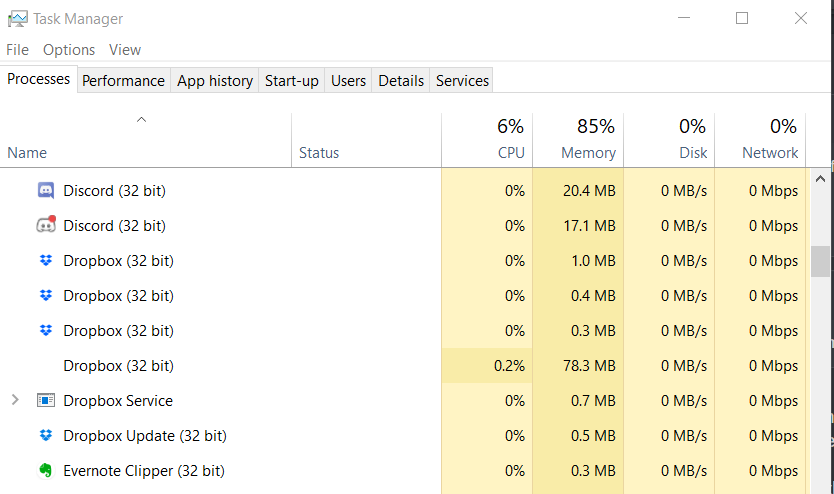
In Windows, the equivalent tool is the Task Manager, and this is what I'm seeing:


So I don't understand where all these gigabytes of memory are going that the new Dropbox is said to use.

I am also yet to find any reference to a limit on the number of machines on which I can synch, on my paid, Dropbox Plus, plan.

This is a really stupid question, I know, but is the comparison that's got people so upset the comparison between the old and the new Dropbox generally or the specific comparison between old vs new Dropbox vs iCloud Drive on a Mac machine?
 
Last edited:

Khamon

Folk Harpist
Joined
Sep 23, 2018
Messages
3,097
Location
Alabama
SL Rez
2003
Joined SLU
2007
I also see no massive resource usage or indication of impending limitation. My current configuration only includes three devices, though, so I may not be notified.
 

Argent Stonecutter

Emergency Mustelid Hologram
Joined
Sep 20, 2018
Messages
7,484
Location
Coonspiracy Central, Noonkkot
SL Rez
2005
Joined SLU
Sep 2009
SLU Posts
20780
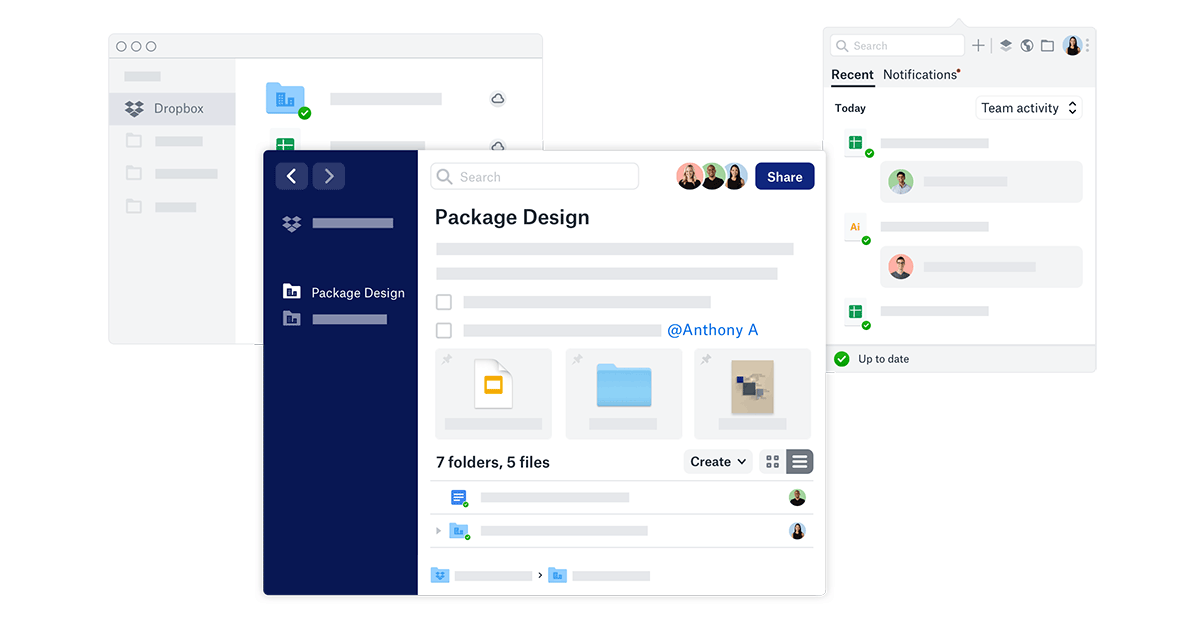
Read Gruber's article. He's seeing a completely new desktop client that works like the Dropbox client on mobile that is oriented around putting files into dropbox and taking them out instead of just syncing everything. The one that includes a whole web browser. If he's mistaken and this is just something Dropbox is promoting aspirationally, that would be great.

But youse guys, Khamon and Innula and Ava, you are still looking at the existing sync client, not this new thing that Gruber apparently got a preview of, so of course you're not seeing the bloat Gruber is talking about. Neither am I. But if he's right and this new thing is really in our future that's going to be a hard blocker for me. Which is why I'm not going to start paying for Dropbox when it seems like I'm about to have to drop it.
 

Clara D.

Coffee Squirrel is judging you.
Joined
Dec 24, 2018
Messages
3,540
SL Rez
2006
Joined SLU
Back in the day.
SLU Posts
0
It's all just a reminder that anything free and awesome will never last forever. They're either start charging for it or make it suck. Or both.

About time I got off my arse and backed the stuff up elsewhere (which I needed to anyways, "eggs in one basket" isn't the best solution). It'll probably be Google, as utterly shit as their privacy is they do have the "definitely not going anywhere for a while" thing on their side. While I'm perfectly capable of setting up a server, the main reason I use cloud services is for *off-site* redundancy, so even if all else fails I can still get to the stuff using the local Library's computers.

I realize it's not nearly as AWSUM and 1337 as just using a thumb drive that's ever so slightly easier for a tweaker to jack out of my backpack when I'm riding the bus than a remote file sharing service, but to each his won.
 
Last edited:

Ava Glasgow

Ava Ava hot like lava
VVO Supporter 🍦🎈👾❤
Joined
Sep 21, 2018
Messages
450
Location
Underwater
SL Rez
2007
Joined SLU
2008
SLU Posts
2365
I am also yet to find any reference to a limit on the number of machines on which I can synch, on my paid, Dropbox Plus, plan.

I may have misread, but I thought they were saying the device limit was for the unpaid plan.
 
  • 1Thanks
Reactions: Innula Zenovka

Ava Glasgow

Ava Ava hot like lava
VVO Supporter 🍦🎈👾❤
Joined
Sep 21, 2018
Messages
450
Location
Underwater
SL Rez
2007
Joined SLU
2008
SLU Posts
2365
Read Gruber's article. He's seeing a completely new desktop client that works like the Dropbox client on mobile that is oriented around putting files into dropbox and taking them out instead of just syncing everything. The one that includes a whole web browser. If he's mistaken and this is just something Dropbox is promoting aspirationally, that would be great.

But youse guys, Khamon and Innula and Ava, you are still looking at the existing sync client, not this new thing that Gruber apparently got a preview of, so of course you're not seeing the bloat Gruber is talking about. Neither am I. But if he's right and this new thing is really in our future that's going to be a hard blocker for me. Which is why I'm not going to start paying for Dropbox when it seems like I'm about to have to drop it.


Exploring the website last night, I saw mention of the new desktop app. To me it didn't look like a replacement, but an addition, meaning you can continue to sync as usual and also use the app when desired.

...

Okay, found the Dropbox blog post on it, and they are very clear: "don’t worry—you can still organize all your work from the Dropbox folder in Windows File Explorer and macOS Finder."


Clara D.

Coffee Squirrel is judging you.
Joined
Dec 24, 2018
Messages
3,540
SL Rez
2006
Joined SLU
Back in the day.
SLU Posts
0
Exploring the website last night, I saw mention of the new desktop app. To me it didn't look like a replacement, but an addition, meaning you can continue to sync as usual and also use the app when desired.

...

Okay, found the Dropbox blog post on it, and they are very clear: "don’t worry—you can still organize all your work from the Dropbox folder in Windows File Explorer and macOS Finder."

I hope it stays opt-in. There's a whole lot of "don't need all that" going on.