Dropbox is alienating its user base and basically sucks now

Innula Zenovka

Nasty Brit
VVO Supporter 🍦🎈👾❤
Joined
Sep 20, 2018
Messages
23,881
SLU Posts
18459
Exploring the website last night, I saw mention of the new desktop app. To me it didn't look like a replacement, but an addition, meaning you can continue to sync as usual and also use the app when desired.

...

Okay, found the Dropbox blog post on it, and they are very clear: "don’t worry—you can still organize all your work from the Dropbox folder in Windows File Explorer and macOS Finder."

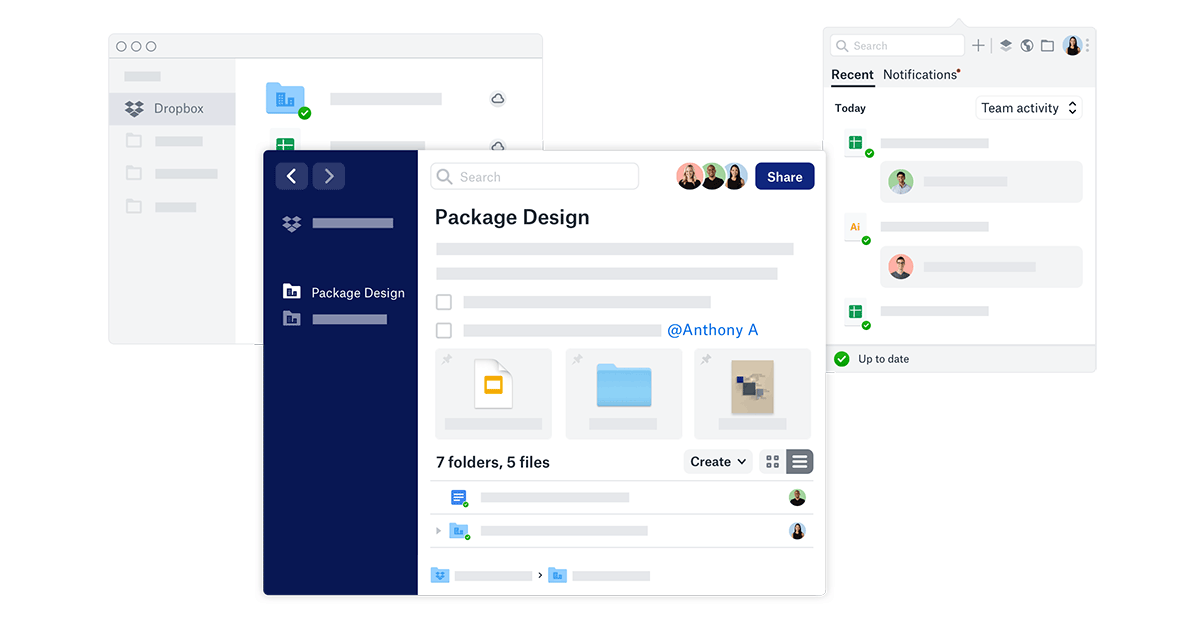
I'd read that blog post, too, and as far as I can see all the functionality discussed there can be found in Dropbox 76.3.120, if I examine the contents of my Dropbox through my regular web browser -- Vivaldi or Firefox or whatever.

There is an separate desktop app, but I don't see why I would to use it rather than continue to work on my files and folders as I already do. However, it doesn't seem to use a great deal of additional memory.

So I suspect I may unwillingly have to disagree with Argent Stonecutter here -- as far as I can tell, everything we've discussed so far I seem to be able to see or use already on my PC.

So I think what I already have is whatever some people are dismissing as too bloated and to great a memory hog.
 
Last edited:

Noodles

The sequel will probably be better.
Joined
Sep 20, 2018
Messages
5,995
Location
Illinois
SL Rez
2006
Joined SLU
04-28-2010
SLU Posts
6947
At this point I am just going to continue using drop box as business as usual unless it breaks.

I use Dropbox primarily for two things. I sync all of my Second Life "working files." Mesh texture template files and random scripts in text documents mostly. I have a deeper archive on my NAS for sorted screen shots and OAR files and generally larger stuff.

I also use it to sync working blog files. Text documents of writing, Photoshop files for graphics, etc.

None of it is very large.

I use One Drive for most other Documents (docs and xls) because I can open them with Office on my phone.
 

Argent Stonecutter

Emergency Mustelid Hologram
Joined
Sep 20, 2018
Messages
7,461
Location
Coonspiracy Central, Noonkkot
SL Rez
2005
Joined SLU
Sep 2009
SLU Posts
20780
So I suspect I may unwillingly have to disagree with Argent Stonecutter here -- as far as I can tell, everything we've discussed so far I seem to be able to see or use already on my PC.
It doesn't sound like you're disagreeing with me. The OP and Gruber were talking as if the new app would be a mandatory update, and apparently either Dropbox has walked that back or Gruber was misinformed.
 

Innula Zenovka

Nasty Brit
VVO Supporter 🍦🎈👾❤
Joined
Sep 20, 2018
Messages
23,881
SLU Posts
18459
It doesn't sound like you're disagreeing with me. The OP and Gruber were talking as if the new app would be a mandatory update, and apparently either Dropbox has walked that back or Gruber was misinformed.
I seem, though, to have the new app on my laptop. At least I can find everything discussed in the Dropbox blog about the "new Dropbox" I can (after a bit of poking round) find on my Dropbox, both in my web browser and by using the Dropbox desktop app (which faithfully reproduces the website layout, slightly streamlined).

Unless there's yet another new app that the OP and Gruber have seen that's nowhere hinted at on the website, to follow the one that's just been introduced, I don't understand what else my latest installation of Dropbox can be, since that certainly includes a lot of new features and integration with other apps that weren't there before (and I can't believe they were all there before but I just never noticed them).
 

Argent Stonecutter

Emergency Mustelid Hologram
Joined
Sep 20, 2018
Messages
7,461
Location
Coonspiracy Central, Noonkkot
SL Rez
2005
Joined SLU
Sep 2009
SLU Posts
20780
I have only found a link "Try the new Dropbox Desktop App" in my Dropbox preference pane, that takes me to www.dropbox.com/desktopapp which says "Early Access - Try the new desktop app". I only have Dropbox integration in apps that have already had Dropbox integration since forever, like my password safe.
 

Innula Zenovka

Nasty Brit
VVO Supporter 🍦🎈👾❤
Joined
Sep 20, 2018
Messages
23,881
SLU Posts
18459
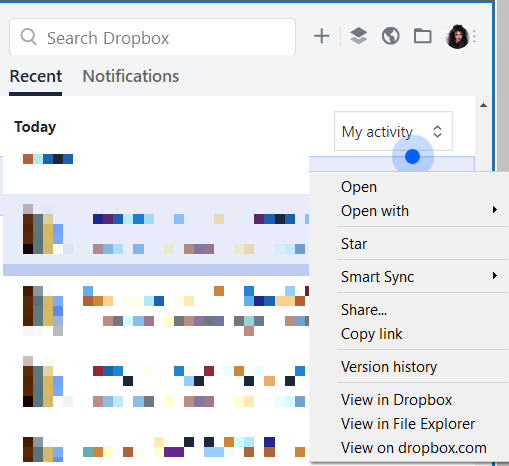
What do you see if you right-click the little dropbox icon in the taskbar? Does it open up a small window with two tabs, Recent and Notifications? If it does, try right-clicking on one of the recent notifications (or find something using the search box -- it understands wildcards like "*.lsl" for all my saved lsl scripts ) and choosing View in Dropbox (as opposed to "view on dropbox.com").

If that works for you, then you have the same thing as me.
 

Argent Stonecutter

Emergency Mustelid Hologram
Joined
Sep 20, 2018
Messages
7,461
Location
Coonspiracy Central, Noonkkot
SL Rez
2005
Joined SLU
Sep 2009
SLU Posts
20780
I don't have a taskbar, I have a menu bar. I have two tabs, but right-clicking on the notifications does nothing, and the only thing Dropbox.app does is give me the login dialog if I'm not logged in and then install the menu bar icon if it's not already there.
 

Innula Zenovka

Nasty Brit
VVO Supporter 🍦🎈👾❤
Joined
Sep 20, 2018
Messages
23,881
SLU Posts
18459
What OS is it? If it's not Windows, I don't know what to expect.

But I've noticed that the Recent tab takes a while to populate, at least the first time.

When I right-click on the little dropbox icon, I see something like this (I've obscured the file icons and titles because reasons) and "View in dropbox" opens up an app that looks very like the website. Though I don't really see why I'd need to use it if I didn't feel like it.


Noodles

The sequel will probably be better.
Joined
Sep 20, 2018
Messages
5,995
Location
Illinois
SL Rez
2006
Joined SLU
04-28-2010
SLU Posts
6947
Since we are sort of talking Dropbox alternatives, one thing I want to add that I don't like about One Drive.

One drive does not work at all over a VPN of any kind. It refuses to sign in, which is kind of lame. I've experienced this over both PIA to an in the US out node and using OpenVPN to my home network.


Also my dropbox looks like Innula's image, with the tabs.
 
  • 1Thanks
Reactions: Innula Zenovka

Argent Stonecutter

Emergency Mustelid Hologram
Joined
Sep 20, 2018
Messages
7,461
Location
Coonspiracy Central, Noonkkot
SL Rez
2005
Joined SLU
Sep 2009
SLU Posts
20780
What OS is it? If it's not Windows, I don't know what to expect.
Mac, of course. And no, I don't have that option anywhere. There's a view in Dropbox but that takes me to the website like it always has.
 
  • 1Thanks
Reactions: Innula Zenovka

Innula Zenovka

Nasty Brit
VVO Supporter 🍦🎈👾❤
Joined
Sep 20, 2018
Messages
23,881
SLU Posts
18459
Mac, of course. And no, I don't have that option anywhere. There's a view in Dropbox but that takes me to the website like it always has.
So in that case it would seem I have a more recent version of Dropbox than do you, including a desktop app in which I can view items locally, so I must assume that I'm using the new and contentious version.

All I can say is that, so far, I have no complaints about it. My data is all stored on a hard drive at home (and also backed up elsewhere) but it's visible and accessible on any of my machines as if it were stored in the local Dropbox folder.

All I can say is that I've very satisfied so far, in that it's as if my little Lenovo IdeaPad (which I had bought in an emergency when my normal laptop was in for repairs and has about enough memory to hold a shopping list, though admittedly quite a long one), has suddenly sprouted an enormous data drive, so suddenly it's changed from being a bit of a white elephant to a very useful alternative if I don't want to carry the main laptop around with me.
 

Bartholomew Gallacher

Well-known member
Joined
Sep 26, 2018
Messages
6,876
SL Rez
2002
Hi folks,

since Nextcloud recently released version 16 of their software, I decided that it is that time again to put it on the test for it's file sync speed. The test case I've got therefore in mind is quite typical for Instagram users, namely syncing a little bit more than 1.000 Instagram photos to that own cloud, where it in the past always was quite slow and failed to be on par with commercial products like Dropbox, or the opensource Seafile solution.

So first I've decided on an safe for work Instagram channel which I'll be using as test case: Grumpycat. 1.398 photos, perfect. Next I've downloaded copies of all photos of that channel on my computer. I've been using Windows 10 and the program 4K Stogram to get this job done. I choose this program because it's got an easy UI and the free version is more than good enough to get this job done. If you want to use something more nerdy, then you can use Instaloader from Github from example which runs under Python.

The download took a few minutes; after it was finished, I had a new sub folder "4K Stogram" in my pictures folder with all the glory of Grumpycat in it. Perfect!

Upfront some data to put it into context: the files by the way were being served from my SSD drive; my upload bandwidth is in average around 11.6 Mbit/s, download 48 Mbit/s.

The stock Nextcloud sync client was being used with its default settings. The Nextcloud server is being hosted on my own, dedicated root server running Gentoo Linux, kernel 4.15.9 in a virtual machine, PHP 7.2 and uses MySQL for speed reasons as data base engine; only the vanilla installation on server side without any additional extensions was being used. All traffic was encrypted.

The host server has a Intel(R) Xeon(R) CPU E3-1271 v3 @ 3.60GHz, 32 GB of RAM and 2x4 TB HDDs in RAID1 setup, and is quite bored. So in short a more than powerful enough machine for that kind of test. The desktop is an i7-6700K with 16 GB of RAM and a 500 GB SDD, so also powerful enough to be a good client. As virus scanner only Windows Defender was being used, nothing else. The desktop machine was hooked up on the internet router directly via an ethernet cable.

First I've removed all movie files from that folder, so the file count went down from 1.422 to 1.379 pictures which needed to get synced, which used 157 MB of disk space or in average around 113 KB per picture, which is quite typical for this type of usage; then I've copied it into the sync folder of my running, virgin Nextcloud folder and watched the client do its job, and measured the time until it was done.

If the sync client would be able to use my upload connection good enough, I should be done in roughly 157 MB / [ (11.600 Mbit/s / 8)] = 157 MB / 1.45 MB = 108 seconds. That's what I'd expect from a fast syncing experience.

The first ETA of the client was around 20 minutes, after I've moved the folder into the sync folder. Looking at my web server log I've noticed that every second 2-3 pictures where being uploaded by the client. The client uses WebDAV for its uploads.

The time it took in reality for the initial sync was 19 m 27 s on an idle home network, so the ETA was actually quite good; the client also yielded one strange sync error, he was unable to sync one file, maybe due to name issues? I don't know; otherwise the sync went fine.

Now to Dropbox: again I've been using the same desktop/networking setup, recent stock original Dropbox sync client. I've moved the same bunch of files into the Dropbox sync folder; the sync was done in 2 m 26 s, which is a real good time. No sync error on Dropbox, though.

Conclusion: Nextcloud for sure improved since my last test; but uploading files is still slow due to it's architecture compared to the well established, commercial market leader Dropbox and other solutions as well. Dropbox is roughly eight times faster doing its initial sync on my test file case compared to Nextcloud.

If you don't care about speed, or just have view, big files to upload, then maybe it's a viable solution for you. If fast syncing speed which is able to saturate your upload bandwitdth during the initial sync is a must for you and you've got ten thousands of small to medium files, you'd better go looking for another solution, because Nextcloud sadly still cannot deliver that.
 

Argent Stonecutter

Emergency Mustelid Hologram
Joined
Sep 20, 2018
Messages
7,461
Location
Coonspiracy Central, Noonkkot
SL Rez
2005
Joined SLU
Sep 2009
SLU Posts
20780
I upload to my "cloud" (if you own the hardware, it's a colo) with tar cfz - $thingumy | ssh remotehost "cd $wherever; tar xfz -"

Also it seems like the original issue with Dropbox is fortunately optional. Which now means I'm back to deciding if I need to pay for it...