What's next for Windows?

Free

*censored*
VVO Supporter 🍦🎈👾❤
Joined
Sep 22, 2018
Messages
42,315
Location
Moonbase Caligula
SL Rez
2008
Joined SLU
2009
SLU Posts
55565
I guess the thing is....like, with WordPad. WordPad is a very simple bare-bones word processor app that's always been bundled with Windows so that someone who never plans or needs to have an actual fully-featured pro-level word processor for serious work still has something available that can do the job once or twice a year when they unexpectedly have to type up a letter or something.
Those people without a fully-featured pro-level word processor will have to start looking elsewhere:

Three Decades After Launch, Microsoft's WordPad Is Headed to the Trash Bin
 
  • 1Sad
Reactions: Govi
Joined
Sep 19, 2018
Messages
6,769
Location
NJ suburb of Philadelphia
SL Rez
2003
SLU Posts
4494
Those people without a fully-featured pro-level word processor will have to start looking elsewhere:

Three Decades After Launch, Microsoft's WordPad Is Headed to the Trash Bin
Yet again, like ms paint, another program that did not have enough features to really make it usable. If you just want to type something out there is notepad. If you want something more serious there is the free alternative of libre office. I am not a big ms supporter by any means but libre office has many bugs and limitations that drove me crazy so I paid for ms word.
 

Argent Stonecutter

Emergency Mustelid Hologram
Joined
Sep 20, 2018
Messages
7,461
Location
Coonspiracy Central, Noonkkot
SL Rez
2005
Joined SLU
Sep 2009
SLU Posts
20780
I used Wordpad on the regular when I was at HP, because Microsoft word format is execrable. Ironically the best support for Microsoft rich text format files is now TextEdit on the Mac.
 

Dakota Tebaldi

Well-known member
VVO Supporter 🍦🎈👾❤
Joined
Sep 19, 2018
Messages
9,797
Location
Ohio
Joined SLU
02-22-2008
SLU Posts
16791
Nowadays Microsoft has free web-based versions of its basic Office apps like Word. Functionality wise they're somewhere between the full desktop apps and something like WordPad. It would do anything you needed something as simple as WordPad to do. Only thing is, it IS a web app, so obvs you need to be online to use it. It does let you save in OpenDocument format though, so there's that I suppose.
 
  • 1Like
Reactions: Essence Lumin

Argent Stonecutter

Emergency Mustelid Hologram
Joined
Sep 20, 2018
Messages
7,461
Location
Coonspiracy Central, Noonkkot
SL Rez
2005
Joined SLU
Sep 2009
SLU Posts
20780
Nowadays Microsoft has free web-based versions of its basic Office apps like Word. Functionality wise they're somewhere between the full desktop apps and something like WordPad. It would do anything you needed something as simple as WordPad to do. Only thing is, it IS a web app, so obvs you need to be online to use it. It does let you save in OpenDocument format though, so there's that I suppose.
OpenDocument format has to be able to roundtrip through Word, so it uses the same document model. So it's the same format with a different paint job.

Same with Apple's "Pages". Has to copy Word's document model if it's going to get office workers to use it.

Seriously, I maintain documents in raw HTML by choice, because it's a nice clean nested format, not Word's "first paragraph and subsequent paragraphs" crap.
 

Dakota Tebaldi

Well-known member
VVO Supporter 🍦🎈👾❤
Joined
Sep 19, 2018
Messages
9,797
Location
Ohio
Joined SLU
02-22-2008
SLU Posts
16791
Windows update is out. It's rolling, so not everyone will get it immediately, but it should be available for you in the next day or so if it isn't already. It is an optional update, so it will only show if you have optional non-security updates toggled on. It does come with the Copilot preview app.

I can't give you like a comprehensive review of Copilot yet, but I have poked at it a few times. So far Copilot is basically a Bing Chat/ChatGPT sidebar that can also open apps on your computer or change settings or modes - for example, I was able to ask it to switch dark mode on or off, turn on Do Not Disturb, start a Focus session (you know what those are, right? :p ), and switch Bluetooth on or off.

Launching apps is a bit there and not. It can launch all of the bundled Windows and Store apps and....SOME things that are installed with winget, but not everything. I haven't found a pattern yet as far as what winget-installed things it can launch and what it can't. It will launch Bitwarden and Discord and my VPN, but not Blender or Voicemeeter.

Being a preview, there's not really any integration yet. It could launch Outlook, but it couldn't put an appointment on the calendar like Cortana could. The only settings toggle right now lets it see what's on the active tab on open Edge browser for context when asking things - I haven't played with that yet. I haven't tried voice interaction yet either.

Aside from the Copilot stuff, I've seen some nice improvements. I forgot to take a mental snapshot of the File Explorer before installing the update, so I don't know 1-to-1 what's different, but there is now an address bar with navigation buttons and the tabs above that. It doesn't seem any more difficult to use or get used to than the previous one.

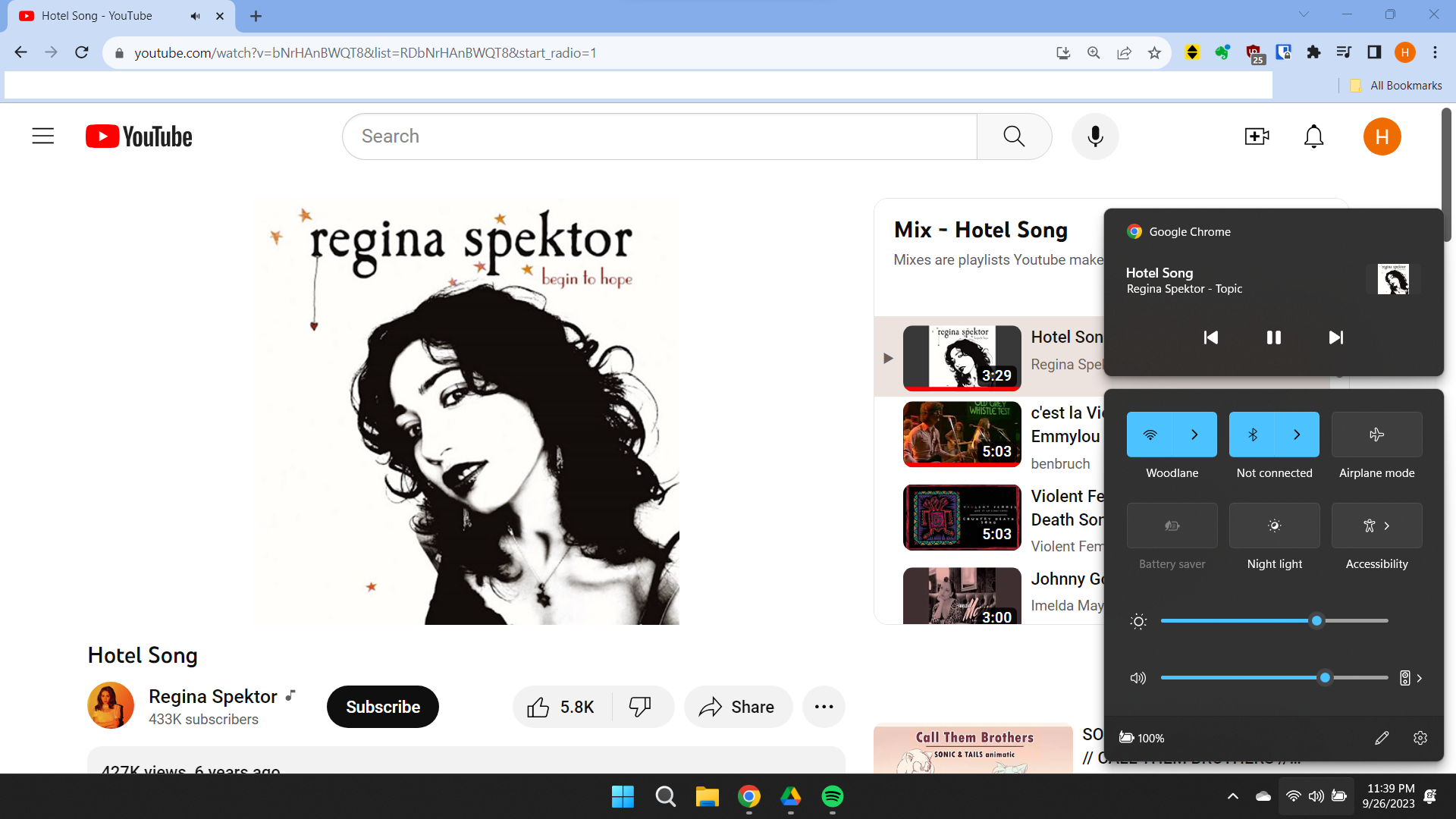
Oh, one big surprise - if you open the Volume Mixer you now get individual volume sliders and input/output device selection for every open application which...that's really nice! I didn't even catch that in the release notes.
 
Joined
Sep 19, 2018
Messages
6,769
Location
NJ suburb of Philadelphia
SL Rez
2003
SLU Posts
4494
Windows update is out.

Being a preview,
I don't know what your are saying about it being a preview. I am not signed up for insider previews though I requested an update through windows update. It says version 22H2 os build 22621.2361 Experience: Windows Feature Experience Pack 1000.22674.1000.0.

Oh, one big surprise - if you open the Volume Mixer you now get individual volume sliders and input/output device selection for every open application which...that's really nice! I didn't even catch that in the release notes.
For me I don't see that. It looks the same (I erased my bookmarks bar).


Dakota Tebaldi

Well-known member
VVO Supporter 🍦🎈👾❤
Joined
Sep 19, 2018
Messages
9,797
Location
Ohio
Joined SLU
02-22-2008
SLU Posts
16791
I mean that the Copilot app itself, specifically, is labeled as a Preview version.

I don't think you had the update - for me its name is "2023-09 Cumulative Update Preview for Windows 11 Version 22H2 for x64-based Systems (KB50303190)". In order for it to show up in your update search, you'll need to have the "Get the latest updates as soon as they're available" option toggled On; that basically opts you into non-security and new-feature updates, or at least marks you eligible for them. I usually have that setting toggled off, but I was curious enough about this particular thing to turn it on long enough to install this update. But, it's not an Insider track update - anybody can get it.

When you do get the update, you can get to the volume mixer by clicking the little button on the right side of that main volume slider - it's icon will be different in the updated version.
 
Last edited:

CronoCloud Creeggan

Eliza, because Free says so.
VVO Supporter 🍦🎈👾❤
Joined
Sep 26, 2018
Messages
2,476
Location
Central Illinois
SL Rez
2006
Joined SLU
07-25-2012
SLU Posts
278