Snapshots and modern expectations

Monica Dream

In my last hour I'm a slave to the power of death
Joined
Dec 21, 2019
Messages
1,267
SL Rez
2005
Joined SLU
Sept 2010
SLU Posts
7008
I'm not sure if this question shouldn't go in one of the other subforums -but I'm putting it here to get the most views :p

So, any idiot can hit ctrl-shift-s and post a snapshot to snapzilla or whatever. That's fine and that's valid.

What I'm wondering is what is the base amount of post work that someone needs to know to make snapshots that look reasonably modern. I watched a Cassie Middles video (I can't find which one -sorry) where she took a snapshot and then loaded it in photoshop and did a whole slew of postwork on it.

That was where I decided to say "fuck it", personally. As an amateur (IE not for publication, not for work) I basically want to set up my shot, including windlight, sun posistion, graphic settings and go.

eg:


But that doesn't cut it these days -so what I'm wanting to know is; what's the minimum of postwork I have to do to be current? What's the baseline I need to do to create snapshots that are worth sharing with the public (and not just my friends who have to put up with my potato quality shit :p) ?
 

Kamilah Hauptmann

Shitpost Sommelier
Joined
Sep 20, 2018
Messages
15,050
Location
Cat Country (Can't Stop Here)
SL Rez
2005
Joined SLU
Reluctantly
Hell, I switch depth of field off most of the time and get annoyed if I can't see a detail in the background of someone's shot.

That said, I've found if I need to brighten something, I increase the contrast by about 1/3 the amount I increase the brightness.

Otherwise I just try to set up the lighting well in world to take the picture. A light on either side of the camera (not mirrored exactly, do them different), and maybe one directly behind the subject.
 
  • 1Winner
Reactions: Monica Dream

Clara D.

Coffee Squirrel is judging you.
Joined
Dec 24, 2018
Messages
3,540
SL Rez
2006
Joined SLU
Back in the day.
SLU Posts
0
Hell, I switch depth of field off most of the time and get annoyed if I can't see a detail in the background of someone's shot.

That said, I've found if I need to brighten something, I increase the contrast by about 1/3 the amount I increase the brightness.

Otherwise I just try to set up the lighting well in world to take the picture. A light on either side of the camera (not mirrored exactly, do them different), and maybe one directly behind the subject.
After wading through the epic number of windlights I always fiddle with the sun position.
 

OrinB

tutti fruitti
Joined
Sep 20, 2018
Messages
474
Location
UK
SL Rez
2007
Joined SLU
23 Sept 2009
SLU Posts
4771
Most of the work i do is on getting the right angle and layout in the first place, framing the photo with the camera as if i was taking a RL photo.. Making sure my avatar looks comfortable and acceptable. Adjusting the pose and expression.

I have a few windlight settings that work best for me. I always start with those for their skies and then adjust the light accordingly. I find you can get all the shadows and stuff you need pretty much directly out of SL with careful use of the windlight sliders and adjusting the colours and cloud positions etc.

The only processing i do with every picture is in Photoshop. I use the camera raw filter to make my adjustments. Usually working with highlights, shadows, white and black sliders, the clarity slider and then working on various colours if i feel they need adjusting a bit. I usually find SL photos a little on the dead side, so i also like to add grain and i play with the vignette tool too to help focus the image.

Once i've played in the camera raw and got the settings i want, i then clean up the image a bit - tweaking the inevitable collision errors and general oddness. Additionally i may also play with adding light sometimes. If there is a strong directional light or a light fitting in a room, i like to see if that can be enhanced using the Render Lighting Effects filter. I try to keep it subtle. Other filtering effects i use are Lens blur, Blur gallery, noise, overlays, lens flares.

Then i'll crop. I like to make 2:1; 1:1 and 3:1 images for use on my flickr feed.

I'm not really one for extremes unless a particular scene dictates that.
 

OrinB

tutti fruitti
Joined
Sep 20, 2018
Messages
474
Location
UK
SL Rez
2007
Joined SLU
23 Sept 2009
SLU Posts
4771
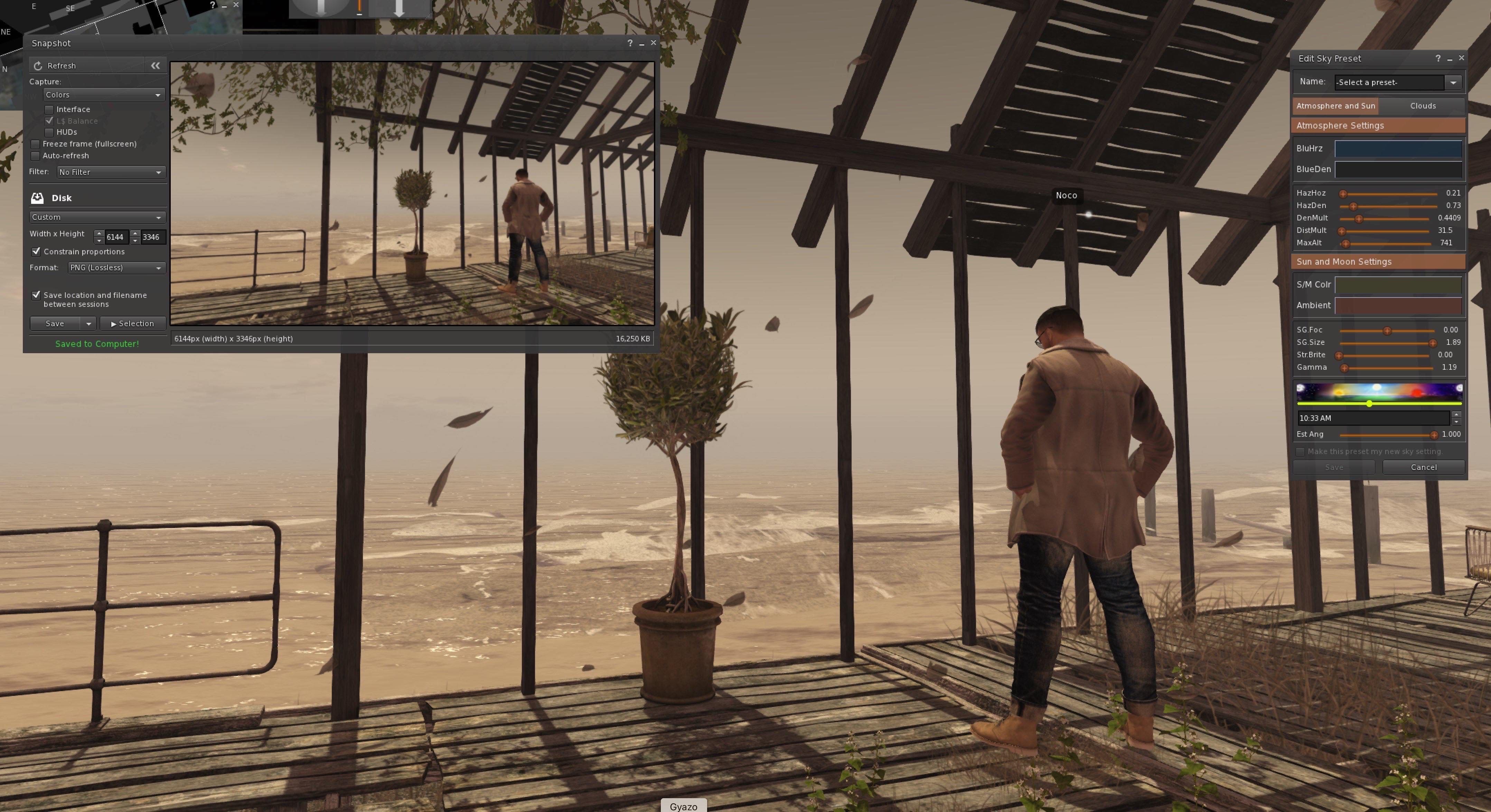
Ok, just had a bit of a play in SL and here's some highlights of my process.

SL Capture set with windlight window open too. I used the prevailing estate settings and just adjusted the clouds, light angle and MaxAlt (this setting usually softens the sky a bit)


Here's the original capture:


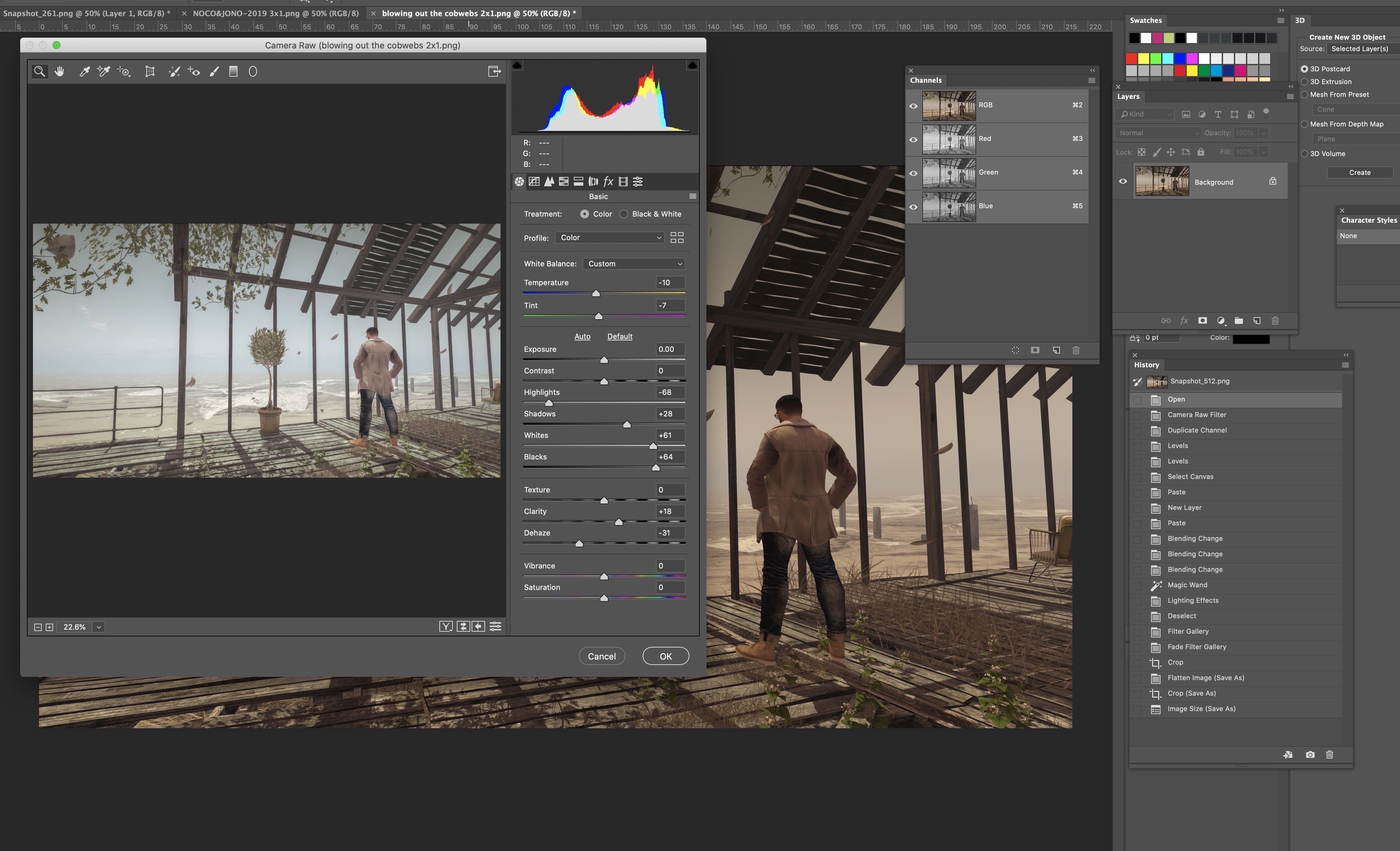
In photoshop I used the camera raw filter to adjust the colour/light/grain etc. I've gone back in to show the camera raw settings here, so you can see from my history palette the steps i took to create this image.


After this, i duplicated the blue channel to help create a mask of just the sky area so i could add some sunlight to the sky using Filter>Render>Lighting Effects.

I then used the filter gallery to add a glow to the whites. I love how it looks on the sea, and really helps the light I introduced to wrap round the pergola, feeling more realistic.

Final image with a 2:1 crop:


Further work i would have done with more time would be add som more of the floating leaves by taking more captures of the movement and copy/pasting them to the final image. Also there are some odd angles to the planes of the leaves, so a bit of clone stamp up round there to help make it feel less CG like. Also i've seen that my avi is floating a bit, so i would have re-taken the image adjusting my level.

All in all i feel i've improved the image without taking too much out of the instant version of the image. Feel free to comment - good or bad.
 
Last edited:

Stora

Well-known member
Joined
Sep 20, 2018
Messages
332
SL Rez
2002
Look up rl photo composition. Rule of thirds is good start. If you plan on portrait photography then lighting will play more of a part. Getting it right in camera will save you a lot of post production time.
 

Bartholomew Gallacher

Well-known member
Joined
Sep 26, 2018
Messages
6,868
SL Rez
2002
Nitpicking mode behind spoiler.
You are talking mostly here about photographs here, but not snapshots.

Rule of thumb: a snapshot happens quickly without giving you much time to manage things and think through upfront, e.g. a celebrity suddenly passing by and you've got only one shot. A photograph instead gives you plenty of time ahead to think about all bells and whistles.

Of course editing can be applied to both; but usually a snapshot gets much less post-production attention than a photograph will get.

@Monica: looking at the example that you've posted it mainly consists of the avatar, which is wearing some pretty dark stuff sitting before a dark background. This makes it quite difficult to visually distinguish between the avatar and the background due to the lack of contrast. If the avatar would have worn much brighter colours, or siting behind a different background would greatly improve the quality of this picture. This is something which could be improved in post editing, e.g. by changing the color of the barn in the background to yellow or white.

Please note that above applies when putting this into a profile where you cannot view the original size; when displaying on Flickr it does apply a lot less, but on original size still e.g. some parts of the bench are very hard to distinguish from the background though.

As a rule of thumb when wearing bright things you normally would go for a darker background, and when having a brighter background you can go for darker things.

Another rule is that sometimes rules are there to be broken for the artistic value.
 
Last edited:
  • 1Winner
Reactions: Monica Dream

Spirits Rising

Quite Blunt
Joined
Sep 21, 2018
Messages
645
Location
Clinton, OH
SL Rez
2006
Joined SLU
08/24/2014
SLU Posts
1476
Unless you're trying to win contests or some such ... There is no need whatsoever to do much editing. Set up your shot, make sure your settings are optimal (without overdoing it for your hardware) snap the shot and either save it to disk (for later editing if you truly must) or send it straight off to Snapzilla (or your site of choice).
 

Clara D.

Coffee Squirrel is judging you.
Joined
Dec 24, 2018
Messages
3,540
SL Rez
2006
Joined SLU
Back in the day.
SLU Posts
0
Hell, I switch depth of field off most of the time and get annoyed if I can't see a detail in the background of someone's shot.

That said, I've found if I need to brighten something, I increase the contrast by about 1/3 the amount I increase the brightness.

Otherwise I just try to set up the lighting well in world to take the picture. A light on either side of the camera (not mirrored exactly, do them different), and maybe one directly behind the subject.
DoF is hard not to overdo with LL's sliders o_O It's like Glow that way, a tiny bit goes a long way.
 

Argent Stonecutter

Emergency Mustelid Hologram
Joined
Sep 20, 2018
Messages
7,443
Location
Coonspiracy Central, Noonkkot
SL Rez
2005
Joined SLU
Sep 2009
SLU Posts
20780
Bartholomew Gallacher - I suspect the OP didn't intend to distinguish between "snapshots" and "photographs", because the tool you use to take photographs in SL is called "snapshot".
 
  • 2Agree
Reactions: Monica Dream and OrinB
Joined
Oct 4, 2018
Messages
122
For SL I very rarely use post processing, I don't really use it for RL photography either. If an image needs lots of post processing to make it look good, it probably wasn't a great composition in the first place. If you want good snaps in SL I think it can help to look at tutorials about composition in photography, give yourself some ideas of stuff you can try in SL.

Be aware of what excites you about a location, or about a subject or an outfit you're taking a picture of. That might turn out to be your focal point, or where you want the viewer to look. You might find more possible focal areas as you explore, but the things that jump out at you first are worth remembering.

Look around a scene or location for a few minutes before you take any pictures. Look at things from different angles, heights etc. You can also play with 'framing' images eg aiming the camera through the branches of a tree/some flowers, or down a narrow street etc. I'd do all that before I start working with the lighting settings, or spend too long on an outfit or props. Give yourself time to find ideas of what you want to do with the image or what you're trying to say. Even if it is just "look at this cool outfit!" if you know what the focus is and you've selected some good viewpoints, you can then play with lighting and inventory items to really bring that out.

I find SL photography a lot like in RL - it takes practice learning to use the camera and the settings you have available, but it's worth spending time to learn that so you're not dependent on filters and post. Post can make some things that extra bit sexier, and sometimes you can't do what you need without it. But I don't think it should be the main feature of a picture. Also, it can be a time consuming pain in the backside, which is why I really avoid it wherever possible :D
 

Argent Stonecutter

Emergency Mustelid Hologram
Joined
Sep 20, 2018
Messages
7,443
Location
Coonspiracy Central, Noonkkot
SL Rez
2005
Joined SLU
Sep 2009
SLU Posts
20780
For SL I very rarely use post processing, I don't really use it for RL photography either.
I pretty much always do a bit of color correction fiddling on RL photographs, simply because neither film nor digital camera sensors seem to match the colors I see.
 
  • 1Agree
  • 1Thanks
Reactions: Monica Dream and OrinB

Monica Dream

In my last hour I'm a slave to the power of death
Joined
Dec 21, 2019
Messages
1,267
SL Rez
2005
Joined SLU
Sept 2010
SLU Posts
7008
Hell, I switch depth of field off most of the time and get annoyed if I can't see a detail in the background of someone's shot.

That said, I've found if I need to brighten something, I increase the contrast by about 1/3 the amount I increase the brightness.

Otherwise I just try to set up the lighting well in world to take the picture. A light on either side of the camera (not mirrored exactly, do them different), and maybe one directly behind the subject.
After wading through the epic number of windlights I always fiddle with the sun position.
Both of those are things I already know ....but that I don't do enough. I've played with DoF but between being lazy and it being fiddly (keeping focus is tricky -at least for me) I tend to not use it

The lights are something obvious I should have thought of myself -I'll play with that too.

Thanks! :)
 

Monica Dream

In my last hour I'm a slave to the power of death
Joined
Dec 21, 2019
Messages
1,267
SL Rez
2005
Joined SLU
Sept 2010
SLU Posts
7008
Most of the work i do is on getting the right angle and layout in the first place, framing the photo with the camera as if i was taking a RL photo.. Making sure my avatar looks comfortable and acceptable. Adjusting the pose and expression.

I have a few windlight settings that work best for me. I always start with those for their skies and then adjust the light accordingly. I find you can get all the shadows and stuff you need pretty much directly out of SL with careful use of the windlight sliders and adjusting the colours and cloud positions etc.

The only processing i do with every picture is in Photoshop. I use the camera raw filter to make my adjustments. Usually working with highlights, shadows, white and black sliders, the clarity slider and then working on various colours if i feel they need adjusting a bit. I usually find SL photos a little on the dead side, so i also like to add grain and i play with the vignette tool too to help focus the image.

Once i've played in the camera raw and got the settings i want, i then clean up the image a bit - tweaking the inevitable collision errors and general oddness. Additionally i may also play with adding light sometimes. If there is a strong directional light or a light fitting in a room, i like to see if that can be enhanced using the Render Lighting Effects filter. I try to keep it subtle. Other filtering effects i use are Lens blur, Blur gallery, noise, overlays, lens flares.

Then i'll crop. I like to make 2:1; 1:1 and 3:1 images for use on my flickr feed.

I'm not really one for extremes unless a particular scene dictates that.
Ok, just had a bit of a play in SL and here's some highlights of my process.

SL Capture set with windlight window open too. I used the prevailing estate settings and just adjusted the clouds, light angle and MaxAlt (this setting usually softens the sky a bit)


Here's the original capture:


In photoshop I used the camera raw filter to adjust the colour/light/grain etc. I've gone back in to show the camera raw settings here, so you can see from my history palette the steps i took to create this image.


After this, i duplicated the blue channel to help create a mask of just the sky area so i could add some sunlight to the sky using Filter>Render>Lighting Effects.

I then used the filter gallery to add a glow to the whites. I love how it looks on the sea, and really helps the light I introduced to wrap round the pergola, feeling more realistic.

Final image with a 2:1 crop:


Further work i would have done with more time would be add som more of the floating leaves by taking more captures of the movement and copy/pasting them to the final image. Also there are some odd angles to the planes of the leaves, so a bit of clone stamp up round there to help make it feel less CG like. Also i've seen that my avi is floating a bit, so i would have re-taken the image adjusting my level.

All in all i feel i've improved the image without taking too much out of the instant version of the image. Feel free to comment - good or bad.
This is great -and it's exactly the kind of hint I was hoping for! I appreciate your taking so much time to lay out exactly what you do.

It's a tremendous help.

I haven't exactly fallen off the turnip truck (and even briefly took a photography class IRL), so if I'm stumped then I figure there's got to be others who are too. This helps out all of us -thank you!
 

Monica Dream

In my last hour I'm a slave to the power of death
Joined
Dec 21, 2019
Messages
1,267
SL Rez
2005
Joined SLU
Sept 2010
SLU Posts
7008
Look up rl photo composition. Rule of thirds is good start. If you plan on portrait photography then lighting will play more of a part. Getting it right in camera will save you a lot of post production time.
Yep, good suggestion -thank you!
 
  • 1Thanks
Reactions: Stora

Monica Dream

In my last hour I'm a slave to the power of death
Joined
Dec 21, 2019
Messages
1,267
SL Rez
2005
Joined SLU
Sept 2010
SLU Posts
7008
Nitpicking mode behind spoiler.
An argument could be made that it would have been clearer if I'd have said "virtual world photography", but I went with the colloquial. Based on the responses I've gotten, I think that was a valid choice.
@Monica: looking at the example that you've posted it mainly consists of the avatar, which is wearing some pretty dark stuff sitting before a dark background. This makes it quite difficult to visually distinguish between the avatar and the background due to the lack of contrast. If the avatar would have worn much brighter colours, or siting behind a different background would greatly improve the quality of this picture. This is something which could be improved in post editing, e.g. by changing the color of the barn in the background to yellow or white.

Please note that above applies when putting this into a profile where you cannot view the original size; when displaying on Flickr it does apply a lot less, but on original size still e.g. some parts of the bench are very hard to distinguish from the background though.

As a rule of thumb when wearing bright things you normally would go for a darker background, and when having a brighter background you can go for darker things.
Now this here is gold -thank you! I didn't see those issues when I took (or even when I posted) that photo, but they're real and they're good to be aware of. I think this is a case where I could have picked a better windlight and/or played with the posistion of the sun to get better lighting.

Another rule is that sometimes rules are there to be broken for the artistic value.
Heh I know from RL that only works when you know what you're doing -which I don't. 😁

Thank you so much for the insights and advice. :)
 
Last edited:

Monica Dream

In my last hour I'm a slave to the power of death
Joined
Dec 21, 2019
Messages
1,267
SL Rez
2005
Joined SLU
Sept 2010
SLU Posts
7008
Unless you're trying to win contests or some such ... There is no need whatsoever to do much editing. Set up your shot, make sure your settings are optimal (without overdoing it for your hardware) snap the shot and either save it to disk (for later editing if you truly must) or send it straight off to Snapzilla (or your site of choice).
I half agree with you. Probably 80% of my snapshots are intended more for blogging (kinda) than for being artistic. I'm showing what I'm doing (because my memory is shit), or I'm showing off an event ("hey! look! more than 3 people in opensim! woot!"). In those cases I'm totally fine with simply taking the shot and moving on.

I'm asking because I look at the various groups on flickr and realize that I don't quite have the chops, my photos aren't good enough to post. In those cases; where I want to participate in the different groups, I think it's necessary to know and to do some post-work. To avoid looking dated, if nothing else.