DoS attack? How do I stop this?

Beebo Brink

Climate Apocalypse Alarmist
Joined
Sep 20, 2018
Messages
7,046
SL Rez
2006
I've been having increasing problems with my internet connection for months. I haven't called my ISP because they refuse to troubleshoot because I'm not using an "approved" router. So until I have the time (and the courage) to try installing their router, I'm on my own with my Netgear47 router.

One of the problems is that my signal gets so weak that my Roku streaming disconnects. This can happen several times over the course of a day; other days we're fine. It finally occurred to me to check out the router admin console to see if someone was hacking into my internet connection. The router logs showed this:

[DoS attack: ACK Scan] from source: 172.99.33.13:53, Saturday, April 22,2023 13:09:42
[DoS attack: ACK Scan] from source: 172.99.33.14:53, Saturday, April 22,2023 13:07:50
[DHCP IP: (192.168.0.9)] to MAC address DE:00:54:2F:F4:40, Saturday, April 22,2023 13:06:22
[DoS attack: ACK Scan] from source: 74.40.74.40:53, Saturday, April 22,2023 13:05:46
[DoS attack: ACK Scan] from source: 74.40.74.40:53, Saturday, April 22,2023 13:03:41
[DoS attack: ACK Scan] from source: 172.99.33.11:53, Saturday, April 22,2023 13:03:14
[DoS attack: ACK Scan] from source: 74.40.74.40:53, Saturday, April 22,2023 13:02:43
[DoS attack: ACK Scan] from source: 172.99.33.7:53, Saturday, April 22,2023 13:02:17

I have no idea what all of this means, but the "DoS attack" part doesn't look good. The solution I'm seeing online is to disable logging. That these are false positives slowing down my router. Can I trust this as the next step?
 

Kokoro Fasching

Well-known member
Joined
Sep 24, 2018
Messages
326
SL Rez
2010
Does your Netgear have the latest firmware, or a third party firmware?

Turning off logging will help the processor load, but then you won't know what is going on either.

Port 53 is DNS, do you have your router set to accept DNS connections from external? Also, the IP addresses are valid DNS servers - perhaps see if you can set your router to use 1.1.1.1 or 8.8.8.8 instead of your ISP dns servers?
 

Beebo Brink

Climate Apocalypse Alarmist
Joined
Sep 20, 2018
Messages
7,046
SL Rez
2006
Does your Netgear have the latest firmware, or a third party firmware?
The router admin center automatically runs a check for firmware each time I log in. No updates, although I suspect the router is too old to get firmware updates anymore.

Turning off logging will help the processor load, but then you won't know what is going on either.
Since this is the first time in about 5 years that I've even checked the logs, that's not really much of an issue. And it wasn't turning off all logs, just the option for DoS logging. I figure it's worth a shot as an easy solution that I can actually understand and undo if it doesn't work. Networking is NOT my strong suit.

Port 53 is DNS, do you have your router set to accept DNS connections from external? Also, the IP addresses are valid DNS servers - perhaps see if you can set your router to use 1.1.1.1 or 8.8.8.8 instead of your ISP dns servers?
And here's where you lost me completely. I've gone through the configuration settings over and over, and there's no mention of a Port 53 or external connections. And I'm not sure I would even know where to change the specific IP addresses you mention. There are IP addresses on several of the panels.

At this point, I guess I'm just going to white-knuckle it until June, when I retire. At that point I can finally tackle installing the router from my current ISP company. If I bollocks it up, the worst that can happen is I lose internet for a few days while I wait for a service call. I can't afford to do that right now, because I'd have to drive in to work to use the office internet and I'm just not willing to do that commute anymore.
 
  • 1Hug
Reactions: Caete

GoblinCampFollower

Well-known member
Joined
Sep 20, 2018
Messages
5,334
SL Rez
2007
The router admin center automatically runs a check for firmware each time I log in. No updates, although I suspect the router is too old to get firmware updates anymore.


Since this is the first time in about 5 years that I've even checked the logs, that's not really much of an issue. And it wasn't turning off all logs, just the option for DoS logging. I figure it's worth a shot as an easy solution that I can actually understand and undo if it doesn't work. Networking is NOT my strong suit.
Networking isn't my strong suit either. I have a masters in CS but didn't take any of the pure network classes. My gut is telling me that you got to shell out for a newer router. I know that's not as nice as finding a special way to fix it, but if you think your router isn't getting new firmware updates than that is a strong sign it is vulnerable at worst. At best it is just losing compatibility with newer networks.
 
  • 2Agree
Reactions: Lexxi and Beebo Brink

Beebo Brink

Climate Apocalypse Alarmist
Joined
Sep 20, 2018
Messages
7,046
SL Rez
2006
My gut is telling me that you got to shell out for a newer router.
Absolutely. Although "newer router" is the one my ISP host sent me about... 3 years ago? It's been sitting on a shelf ever since then because it was the middle of the pandemic and there was no way I was 1) going to install this myself and risk my only connection to my office work, or 2) call for someone to install it for me.

I'm also considering switching to a new fiber optic ISP company that swept through town this past year. Again, not something I'd do when I can't afford a disruption to the internet.

Either way, it's going to be massively disruptive since I'll need to change the password on all my wi-fi devices. Another reason to wait until I'm retired and have more time.
 
  • 1Thanks
Reactions: GoblinCampFollower

WolfEyes

Well known member no one knows
Joined
Sep 20, 2018
Messages
4,502
SL Rez
2004
Joined SLU
2009
If your modem/router is more than 5 years old, it's past time to replace it with a newer one.

I learned that lesson the hard way.
 
  • 1Thanks
  • 1Agree
Reactions: Lexxi and Beebo Brink

GoblinCampFollower

Well-known member
Joined
Sep 20, 2018
Messages
5,334
SL Rez
2007
Absolutely. Although "newer router" is the one my ISP host sent me about... 3 years ago? It's been sitting on a shelf ever since then because it was the middle of the pandemic and there was no way I was 1) going to install this myself and risk my only connection to my office work, or 2) call for someone to install it for me.

I'm also considering switching to a new fiber optic ISP company that swept through town this past year. Again, not something I'd do when I can't afford a disruption to the internet.

Either way, it's going to be massively disruptive since I'll need to change the password on all my wi-fi devices. Another reason to wait until I'm retired and have more time.
Yeah.... I can see why that is painful.

When I got upgraded to fiber, I was warned it could be 8 hours but it was done in like 2.... some companies have gotten pretty good at it... that's probably the least bad option I'd think you have.
 

Bartholomew Gallacher

Well-known member
Joined
Sep 26, 2018
Messages
6,855
SL Rez
2002
It's quite simple: turn the protection and logging off. Problem solved.

The reasoning why: Netgear's firmware is quite well known to produce tons of false warnings, which slow down the system. Aside that in case a real denial of service attack would be in place, there's anyway nothing your router could do against it.

To get better Wifi: get a router/AP, which does use the 5 Ghz frequency band. In case you are still on 2.4 Ghz only, this will help a lot if your affected devices are able to use 5 Ghz as well.
 

Beebo Brink

Climate Apocalypse Alarmist
Joined
Sep 20, 2018
Messages
7,046
SL Rez
2006
It's quite simple: turn the protection and logging off. Problem solved.
That's what I've done for now. It will probably be a few days before I can confirm whether it made any difference at all, but as you said, it can't hurt, so why not.

I feel like my first year or two of retirement will be spent digging myself out from behind deferred chores like this one. Once I've got the ISP/router upgrades decided, then I can move on to whether or not I need a new computer.
 

Katheryne Helendale

🐱 Kitty Queen 🐱
Joined
Sep 20, 2018
Messages
10,432
Location
Right... Behind... You...
SL Rez
2007
Joined SLU
October 2009
SLU Posts
65534
Either way, it's going to be massively disruptive since I'll need to change the password on all my wi-fi devices. Another reason to wait until I'm retired and have more time.
Any router worth anything will let you change your Wi-Fi SSID (your Wi-Fi name) and password. You can change these to what you are using now, and all of your Wi-Fi devices should recognize it. I went through this with my dad when he finally upgraded from his ancient AT&T DSL to fiber and he got a new router.
 
  • 1Thanks
Reactions: Beebo Brink
Joined
Sep 19, 2018
Messages
6,769
Location
NJ suburb of Philadelphia
SL Rez
2003
SLU Posts
4494
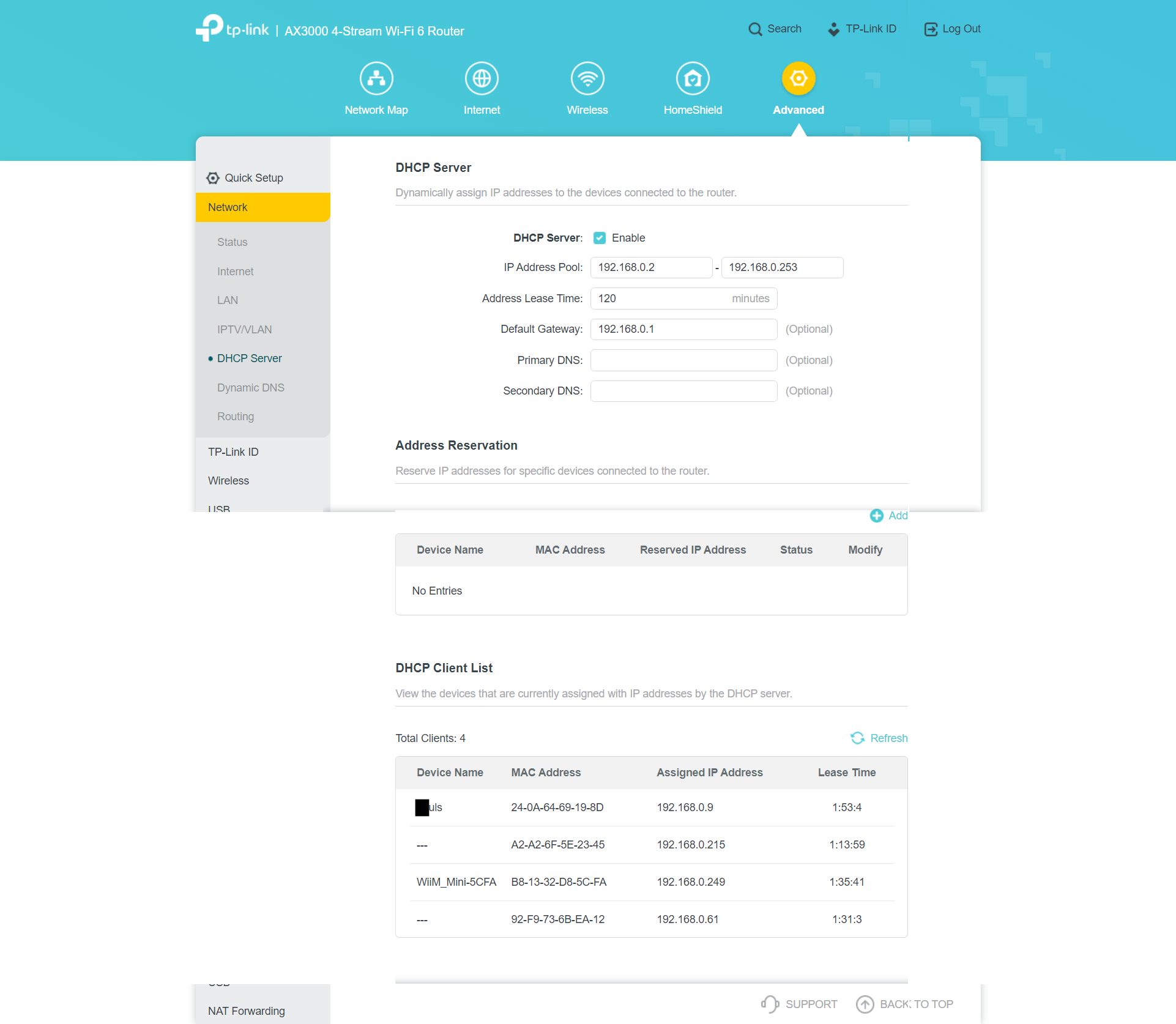
And here's where you lost me completely. I've gone through the configuration settings over and over, and there's no mention of a Port 53 or external connections. And I'm not sure I would even know where to change the specific IP addresses you mention. There are IP addresses on several of the panels.
Every router is different but I'll show you a picture of mine anyway. This is the dhcp settings page. It does not mention port 53. I expect most don't. What it shows is primary dns and secondary dns which is the same thing. In my case, and generally by default that is blank. That means the router gets your addresses automatically from your isp.

 
Last edited:

Casey Pelous

Senior Discount
VVO Supporter 🍦🎈👾❤
Joined
Sep 24, 2018
Messages
3,205
Location
USA, upper left corner
SL Rez
2007
Joined SLU
February, 2011
SLU Posts
10461
Beebo, I went through the "new router anxiety" thing about 6 months ago. Xfinity insisted I absolutely positively HAD to install their new router. It was gonna be SO GREAT and NO TROUBLE AT ALL.

My response was, "The last time you a-holes touched my system it was goobered up for an entire day! GET THEE BEHIND ME VILE BEASTS!"

Finally I caved.

It was NO TROUBLE AT ALL. It actually is SO GREAT. I was tempted to burn the little bastard down just for making me so wrong.

It honestly was almost plug 'n' play. It even transferred the old SSID and password from the old one, along with all the settings. I just sat an answered (easy, plain English) questions for about 10 minutes and it handled everything itself. If your new router is a little white tower branded "Xfinity," it is about as painless as any of this stuff could possibly be. Oh, and I'm getting close to a Gig dl speeds.
 
Joined
Sep 19, 2018
Messages
6,769
Location
NJ suburb of Philadelphia
SL Rez
2003
SLU Posts
4494
It was NO TROUBLE AT ALL. It actually is SO GREAT. I was tempted to burn the little bastard down just for making me so wrong.

It honestly was almost plug 'n' play. It even transferred the old SSID and password from the old one, along with all the settings. I just sat an answered (easy, plain English) questions for about 10 minutes and it handled everything itself. If your new router is a little white tower branded "Xfinity," it is about as painless as any of this stuff could possibly be. Oh, and I'm getting close to a Gig dl speeds.
That is easy. For me, I just don't like paying them $15 / month for that. I have a separate modem and wifi router. My 5 to 10 year old router died a couple of weeks ago. I got a new one for $110 with the screenshot from above. It was dog simple too. I don't think I did much of anything except plug it in and enter the ssid and password.

The one thing that confused me was it has both 2.4 and 5.0 bands as did my old one. The old one needed an ssid for each. This one does some magic and shows just one ssid, then picks the best band for you behind the scenes.
 

Kokoro Fasching

Well-known member
Joined
Sep 24, 2018
Messages
326
SL Rez
2010
Any new WiFi router will use a single SSID, because they have what is called Band Steering. If your device can handle 5.0 and is close enough, move the connection to that. If it is a older device, or too far away, move the connection to 2.4 Makes for a much faster and better Wifi environment.
 
  • 1Agree
Reactions: Katheryne Helendale

Kokoro Fasching

Well-known member
Joined
Sep 24, 2018
Messages
326
SL Rez
2010
Absolutely. Although "newer router" is the one my ISP host sent me about... 3 years ago? It's been sitting on a shelf ever since then because it was the middle of the pandemic and there was no way I was 1) going to install this myself and risk my only connection to my office work, or 2) call for someone to install it for me.

I'm also considering switching to a new fiber optic ISP company that swept through town this past year. Again, not something I'd do when I can't afford a disruption to the internet.

Either way, it's going to be massively disruptive since I'll need to change the password on all my wi-fi devices. Another reason to wait until I'm retired and have more time.
If the fiber company is AT&T, it is quick and easy, but either one should be very seemless. Espcially if you sign up to the new ISP and get it all installed, but do NOT remove the old one yet. Make the new one a new SSID and password, and switch a couple devices over to test. If all good, then you can switch everything else over and and cancel the old one.

If your current ISP is Xfinity, their router/modem install should take about 20 minutes of phone time and 5 minutes of work. The hardest part is getting through to a live agent to get the mac address of the new modem so they can update their system, and then it takes over.
 
  • 1Thanks
Reactions: Beebo Brink

CronoCloud Creeggan

Eliza, because Free says so.
VVO Supporter 🍦🎈👾❤
Joined
Sep 26, 2018
Messages
2,466
Location
Central Illinois
SL Rez
2006
Joined SLU
07-25-2012
SLU Posts
278
One of the problems is that my signal gets so weak that my Roku streaming disconnects. This can happen several times over the course of a day; other days we're fine.
Could be interference, does it happen more at certain times of day? Or it could be overheating or age in the Roku or Router.

It finally occurred to me to check out the router admin console to see if someone was hacking into my internet connection. The router logs showed this:

[DoS attack: ACK Scan] from source: 172.99.33.13:53, Saturday, April 22,2023 13:09:42
[DoS attack: ACK Scan] from source: 172.99.33.14:53, Saturday, April 22,2023 13:07:50
[DHCP IP: (192.168.0.9)] to MAC address DE:00:54:2F:F4:40, Saturday, April 22,2023 13:06:22
[DoS attack: ACK Scan] from source: 74.40.74.40:53, Saturday, April 22,2023 13:05:46
[DoS attack: ACK Scan] from source: 74.40.74.40:53, Saturday, April 22,2023 13:03:41
[DoS attack: ACK Scan] from source: 172.99.33.11:53, Saturday, April 22,2023 13:03:14
[DoS attack: ACK Scan] from source: 74.40.74.40:53, Saturday, April 22,2023 13:02:43
[DoS attack: ACK Scan] from source: 172.99.33.7:53, Saturday, April 22,2023 13:02:17

I have no idea what all of this means, but the "DoS attack" part doesn't look good. The solution I'm seeing online is to disable logging. That these are false positives slowing down my router. Can I trust this as the next step?
They look like false positives to me, ACK's from Frontier's DNS servers. Now if you're NOT using Frontier that's another story.
 
  • 1Thanks
Reactions: Beebo Brink

Beebo Brink

Climate Apocalypse Alarmist
Joined
Sep 20, 2018
Messages
7,046
SL Rez
2006
They look like false positives to me, ACK's from Frontier's DNS servers. Now if you're NOT using Frontier that's another story.
Yes, sadly, I'm using Frontier. They've not been the best ISP, but until very recently (literally months ago), I had no other alternatives. AT&T dropped our area some 20 years ago and shoved us onto Frontier.
 

Beebo Brink

Climate Apocalypse Alarmist
Joined
Sep 20, 2018
Messages
7,046
SL Rez
2006
Any router worth anything will let you change your Wi-Fi SSID (your Wi-Fi name) and password. You can change these to what you are using now, and all of your Wi-Fi devices should recognize it.
THANK YOU! I did not know that, and it's been one of the reasons I've put this off for so long.
 
  • 1Like
Reactions: Katheryne Helendale

Beebo Brink

Climate Apocalypse Alarmist
Joined
Sep 20, 2018
Messages
7,046
SL Rez
2006
What it shows is primary dns and secondary dns which is the same thing. In my case, and generally by default that is blank. That means the router gets your addresses automatically from your isp.
Aha! On my configurations there's a radio button option to get addresses automatically or to get them from the Primary and Secondary DNS. The default setting is to get them from the ISP.
 
  • 1Like
Reactions: Essence Lumin

Beebo Brink

Climate Apocalypse Alarmist
Joined
Sep 20, 2018
Messages
7,046
SL Rez
2006
It honestly was almost plug 'n' play. It even transferred the old SSID and password from the old one, along with all the settings. I just sat an answered (easy, plain English) questions for about 10 minutes and it handled everything itself. If your new router is a little white tower branded "Xfinity," it is about as painless as any of this stuff could possibly be. Oh, and I'm getting close to a Gig dl speeds.
My ISP is Frontier, which does not have the best reputation, so I'm still anxious, but this does make me feel better. Maybe I'll try this on a Friday, giving me the whole weekend to work it out.... Or take all my accumulated CTO and skip the last week of work....